Structuring Models
You can structure Innovator models using system and partial models, components, packages and diagrams.
Various elements can be used for structuring a model:
| Element | Icon Example | Use |
|---|---|---|
| System Model |

|
System models define a software system, provide common profiles for their partial models and form their root. Innovator models can contain multiple system models. |
| Model |

|
Submodels enable structuring at the top-most level within a system, e.g. in various areas of business or modeling phases. |
| Package |

|
Packages are a structuring element without further semantic. They correspond to a folder in a file system. Packages can only contain references, which means they can be used for any number of combinations (e.g. for documentation). |
| Component |

|
Components are a semantic grouping of elements which belong together and show an entity in their own right; often a software component. |
| Diagram |

|
Diagrams are the essential structure element for modeling relationships between model elements. (Due to their exceptional position as a means for visualizing, they are offered separately and not as normal elements in the ribbon. This is why they do not appear in the Model Structure submenu.) |
The Model Contents tool window shows the structure of the current model. You can e.g. structure your model by grouping its elements according to certain criteria and combining them in a respective package. You can specify the criteria which you structure your model by as desired.
This means that you can e.g. sort elements according to their type, thereby combining all of a type's diagrams in one package. If you already want to display your model's architecture, you can also set up a package for various components from your system. Of course, any combinations of these approaches are also possible.
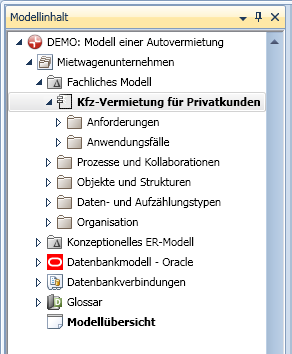
The example shows the structure of a business model which has sub packages, e.g. one for assigning processes, one for use cases etc.
When working with structure elements, the following properties must be taken into consideration:
- Hierarchical Structure
Structure elements can be structured hierarchically. Each structure element can contain as many other structure elements as required. - Model Root
A model's topmost structure element - the model root - is automatically there. It contains the name of the current model. It cannot be deleted. - Identifying an Element
Each model element has an owner. The element is identified by its path in the model structure, its name and its element type. An owner cannot have two elements with the same name and type (in spite of Universally Unique Identifier).
This also applies for the structure element itself.
- Select the model element in the model structure which you want to create a structure element below.
- Select the structure element you want to created from the Start>New>New Sub Package submenu.
The structure element is created below the selected model element and the name is automatically selected to be edited.
- Enter the name of the structure element and press the [Enter] key.